



AI SCANNER · BEGINNER GUIDE
RANGE RADAR
Spots when a market is going sideways, maps the range with its buy and sell zones, and calls tested stretch & snap-back trades back to the middle, with the AI Optimiser built in.
SET UP FOR⏱5-minute charts●US30 · NAS100 · S&P 500◐GER40 · Gold (experimental)◆Range map on any chart
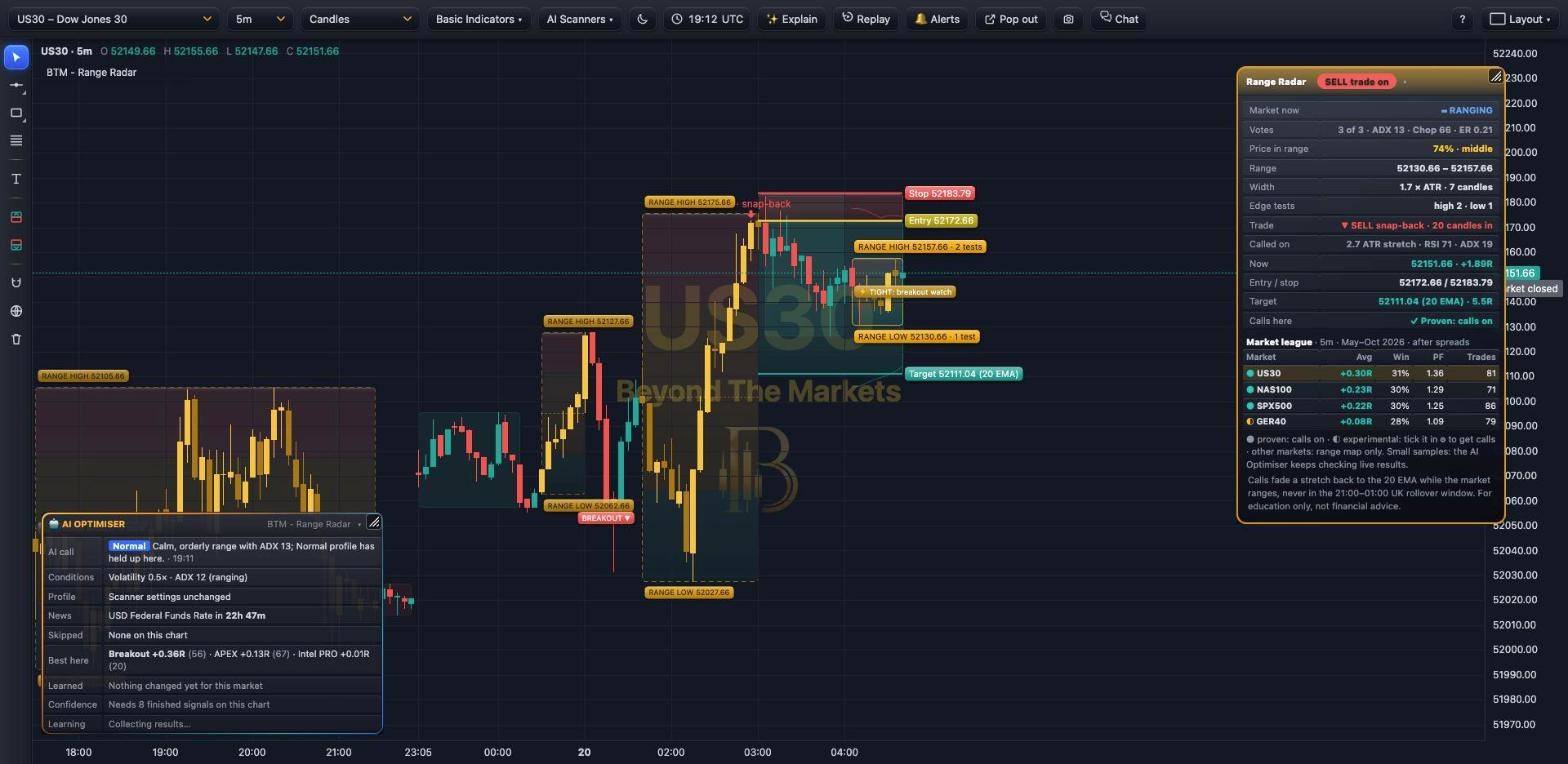 WHAT YOU SEE · US30 5m · SNAP-BACK SELL ON
12345678
1Panel: ranging or trending (a vote of ADX, Choppiness and Efficiency Ratio), where price sits in the range, and the trade.
2The range: amber box with RANGE HIGH and RANGE LOW prices. Red top quarter = sell zone, green bottom quarter = buy zone.
3Gold candles while the market ranges. Trending spells are shaded dull green (up) or red (down).
4The call: entry at the next candle’s open, stop just past the stretch, target the 20 EMA.
5Tags: ⚡ TIGHT (breakout watch), 💪 STRONG RANGE, ◉ Pressing range high / low, ⚡ Stretch building.
6BREAKOUT ▲ / ▼: how an earlier range ended. Older ranges fade away.
7Market league: where calls are on, tested after spreads. Other markets show the range map only.
8🤖 AI Optimiser: the hourly AI call, news, what it skipped and what it has learned.
Use it in 5 steps
- Add itAI Scanners → tick BTM – Range Radar. It works on any market and timeframe as a range map.
- Read the marketGold candles and an amber box = ranging. Dull green or red = trending: use your trend scanners instead.
- Watch the zonesPrice in the red sell zone or green buy zone, with ⚡ Stretch building, means a call may be close.
- Take calls on 5m indicesCalls are on for US30, NAS100 and the S&P 500 on 5-minute charts. ◐ GER40 and gold: tick experimental in ⚙.
- Get the alerts🔔 Alerts → add Range Radar to My alerts, or use + Add alert for any market. Telegram gets a 🤖 note too.
When it calls a trade
- Price is more than 2 ATR from the 20 EMA and RSI(14) is beyond 70 / 30.
- The market isn’t trending: ADX(14) under 20.
- Not in the 21:00–01:00 UK rollover window, when spreads are wide.
- The AI Optimiser hasn’t paused it for news or an AI “Pause”.
Tested on 5-minute candles, May–Oct 2026, after spreads: US30 +0.30R, NAS100 +0.23R, S&P 500 +0.22R a trade; ◐ GER40 and gold are experimental. About 3 in 10 win; winners are bigger. Forex and silver lost.
Good to know
- Range map everywhere, calls only where testing says so. ◐ experimental markets: tick them in ⚙.
- A breakout ends the range: switch to your trend scanners.
- Small test samples: the AI Optimiser keeps checking live results per market.
Good questions for ✨ Explain
- “Is this market ranging or trending?”
- “Where are the buy and sell zones?”
- “Why did Range Radar call this trade?”
Golden rules
- Expect more small losses than wins; the winners pay for them.
- Never move the stop further away.
- Risk 1% or less per trade.
Tip: in a ranging market, your trend scanners lose more often. Range Radar tells you when to step back.
For educational purposes only. The results in this guide come from testing on past prices. Past performance does not guarantee future results, and real spreads, slippage and delays can make results worse. Nothing here is financial advice, and trading carries a high risk of losing money. Read the risk warning.