



AI SCANNER · BEGINNER GUIDE
BTM TITAN PRO
Checks a 7-rule setup list for you, then runs one trade at a time with a stop and four take-profit targets.
◆Profiles tested on gold 5m◆One trade at a time◆Four targets, TP1 to TP4◆Trades London and New York
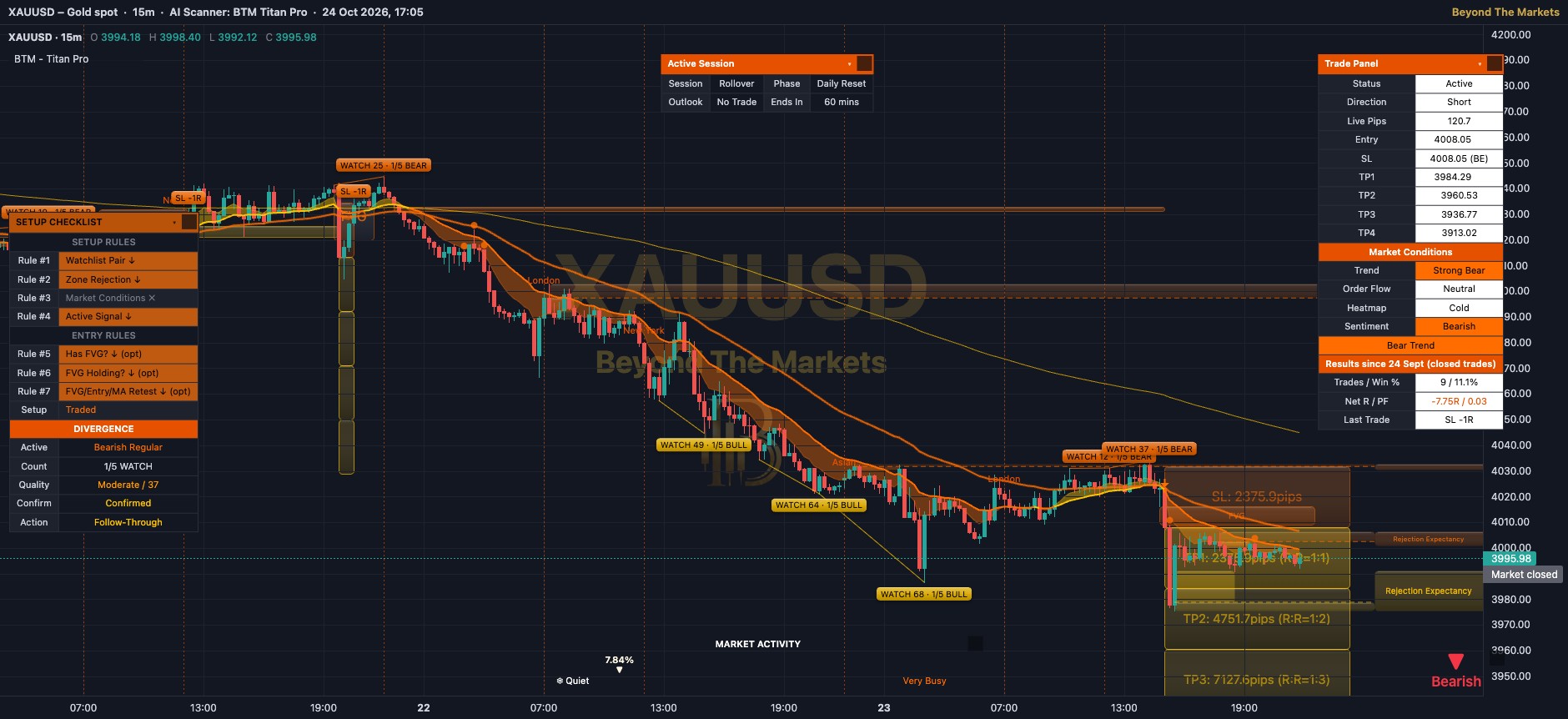 WHAT YOU SEE · GOLD 15m
13456
1Yellow / orange cloud: the band between two moving averages (average-price lines). Yellow = short-term trend up, orange = down.
2Arrows: yellow ▲ under a candle = long signal, orange ▼ over = short. A faded arrow failed the rules, so no trade.
3Zones: yellow boxes = buyers’ areas (demand), orange = sellers’ areas (supply). The tag on the right says what may happen next.
4Trade boxes: orange box = risk down to the stop loss. Four yellow boxes = TP1 to TP4. The exit tag shows the result in R (1R = your risk).
5Session lines: dotted lines mark the start of the Asian, London and New York sessions.
6Bias badge & activity bar: bottom right: ▲ Bullish, ▼ Bearish (red) or ● Consolidating (grey). The bottom bar runs from ❄ Quiet to Very Busy 🔥.
Use it in 5 steps
- Switch it onOpen Charts → AI Scanners → tick BTM – Titan Pro. Its profiles were tested on 5-minute XAUUSD (gold), so start there.
- Check the Setup ChecklistRules #1 to #4 must light up in one direction (↑ long, ↓ short). A grey ✗ means that rule has not passed yet.
- Wait for a bright arrowA trade opens on the close of a bright arrow candle, only in London (02:00–07:00) or New York (08:00–15:30) sessions, New York time.
- Read the boxesThe stop sits 3× the ATR (average candle size) away. TP1 to TP4 sit at 1, 2, 3 and 4 times that risk.
- Let it manage the tradeIt banks 25% at TP1, TP2 and TP3, the rest at TP4. Stop moves to entry after TP1, to TP1 after TP2, to TP2 after TP3.
Reading a trade
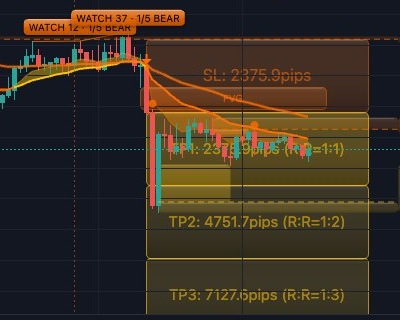
SHORT on Gold 15m, 23 Oct. Orange box = stop loss, yellow boxes = TP1, TP2, TP3. TP1 was hit, so the stop moved to entry (break-even).
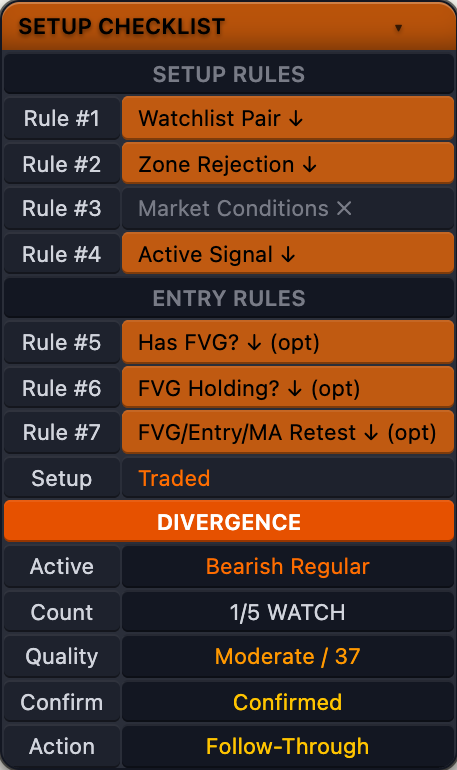
The Setup Checklist
- Rule #1–#4 must pass: Watchlist Pair (1-hour trend agrees), Zone Rejection, Market Conditions and Active Signal.
- Lit cell with ↑ = passes for a long; lit with ↓ = passes for a short. Grey ✗ = not passed.
- (opt) rules (#5 to #7 by default) are for information only. They do not block a trade.
- Setup line: Waiting For Signal, Setup Rules Failed, Valid or Traded.
- DIVERGENCE: price and momentum disagree. “Follow-Through” = confirmed, “Wait Confirmation” = not yet. Not required by default.
Golden rules
- Learning? Stick to gold on 5-minute charts, where the profiles were tested.
- Never skip the stop loss. Risk 1% of your account or less per trade.
- Skip big news. The Active Session panel even calls NY Pre-Open “News Risk”.
- Practise first with the Replay button: play old candles forward and trade them for free.
🔔 Get told when it fires: click Alerts, choose BTM – Titan Pro and tick “Trade entry: LONG” and “Trade entry: SHORT”.
For educational purposes only. The results in this guide come from testing on past prices. Past performance does not guarantee future results, and real spreads, slippage and delays can make results worse. Nothing here is financial advice, and trading carries a high risk of losing money. Read the risk warning.