



AI OPTIMISER · BEGINNER GUIDE
AI OPTIMISER
Built into every AI scanner, always on: a news pause, an hourly AI check, a confidence score on every signal and a learning loop that keeps only what works.
◆Tested settings◆News pause◆Hourly AI check◆Confidence score◆Always learning
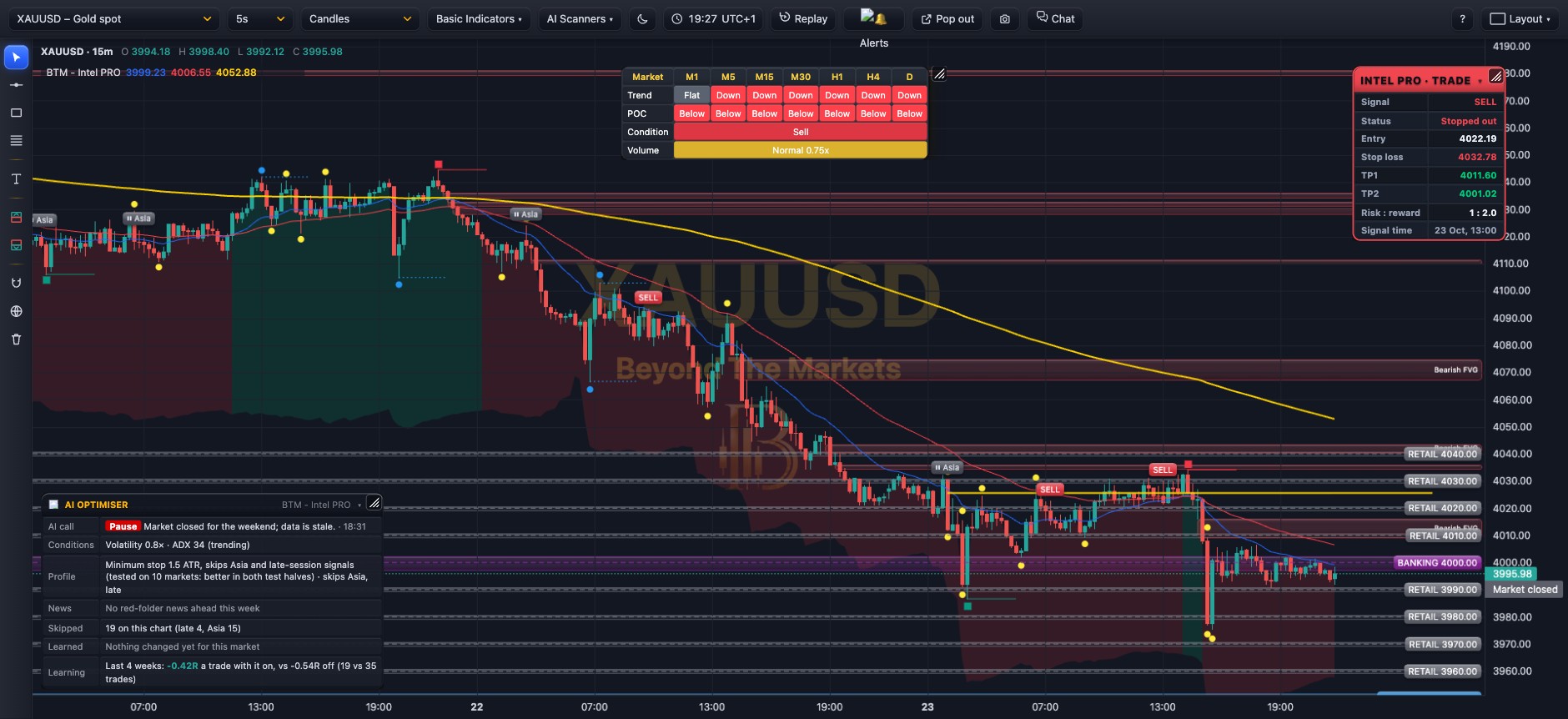 WHAT YOU SEE · INTEL PRO · GOLD 15m
123456
1AI call: every hour the AI rates each market Normal, Cautious (best signals only), Aggressive or Pause, with its reason.
2⏸ Skipped signal: a signal the optimiser held back, with the reason: news, AI pause, or a session or market that tested badly.
3Signal taken: passed every check; its label shows a confidence %. Trade it as that scanner’s own guide explains.
4Profile: this scanner’s tested settings, found by backtesting it on 10 markets.
5Skipped / Learned: how many signals it held back here, and any rule the learning loop has switched off on this market.
6Learning: the last 4 weeks replayed with the optimiser on and off, so you can see whether it is helping.
Use it in 5 steps
- Nothing to switch onThe 🤖 AI Optimiser is always on, built into APEX PRO, Breakout, Bounce, Elite, Titan Pro, Intel PRO, Range Radar, Sniper and Killzone. Just add the scanner to your chart.
- Read the AI callNormal = trade as usual. Cautious = only the best-graded signals. Pause = no new signals on this market for now.
- Respect the news pauseSignals stop from 30 minutes before to 15 minutes after red-folder news for that market’s currencies. The News row counts down to the next one.
- Trade what passesA grey ⏸ label means it was skipped. Everything else is a normal signal with a confidence %: use the scanner’s own entry, stop loss and targets.
- Check it is helpingThe Learning row compares with and without. If the optimiser ever trails on a market, it steps aside there and runs the plain scanner.
The learning loop, all the time
Nothing is fixed. A rule that costs a market money is switched off there; if that keeps paying for a week it is confirmed, if it was a one-off the rule is retested. Where the optimiser trails, the plain scanner runs.
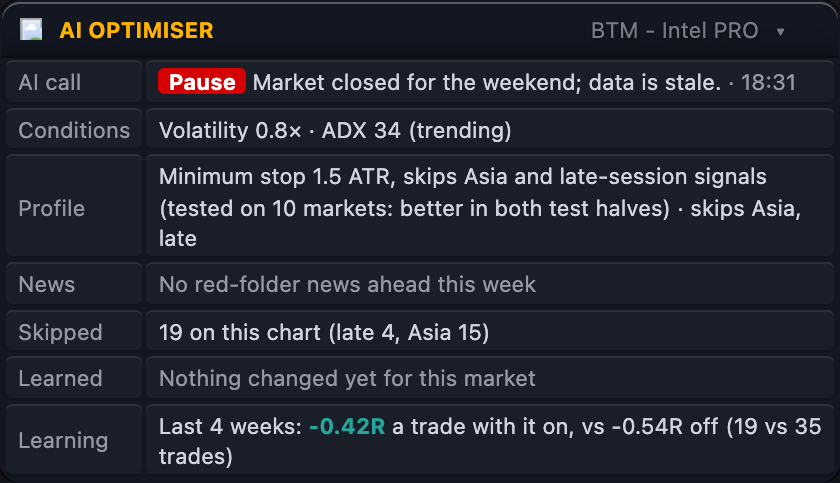
Reading the AI Optimiser panel
- AI call: the latest hourly call, its reason and the time it was made.
- Confidence: how often signals like the latest one have won on this market, and the R they made.
- Profile: the tested settings. A struck-through rule has been switched off on this market.
- News: the next red-folder event, or ⏸ while a news window is on.
- Learned / Manage: what it changed here, how it manages trades, and its 4-week score with and without.
Golden rules
- It filters, it does not predict. A signal it lets through can still lose, so always use the stop loss.
- Risk 1% or less per trade, with or without the optimiser.
- Dashboards: Trend MPH, Heatmap, Market Scanner and Market Radar have a 🤖 AI market note tick box (AI call + next news).
Tip: the optimiser runs by itself on every AI scanner. Just trade the signals it lets through, and use the stop loss on every one.
For educational purposes only. The results in this guide come from testing on past prices. Past performance does not guarantee future results, and real spreads, slippage and delays can make results worse. Nothing here is financial advice, and trading carries a high risk of losing money. Read the risk warning.